

iPhone · iPad
Stay locked in before game time.
You choose which apps to lock and when. Match Mindset holds the line around every game on your team's schedule, so nobody has to remember to put the phone down.
Coming soon to the App Store
See how it works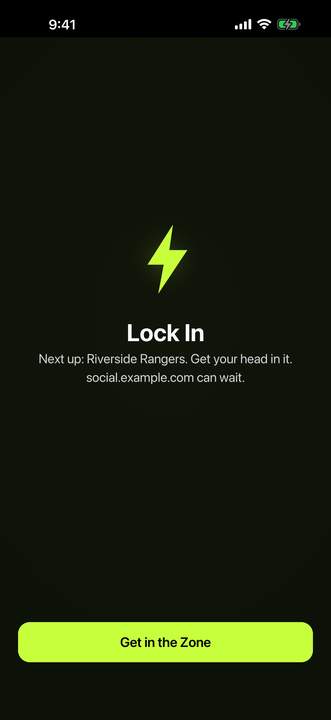
How it works
Set it up in August. Forget it until playoffs.
Three screens and about two minutes. After that the schedule does the deciding, and nobody has to police anybody.
-
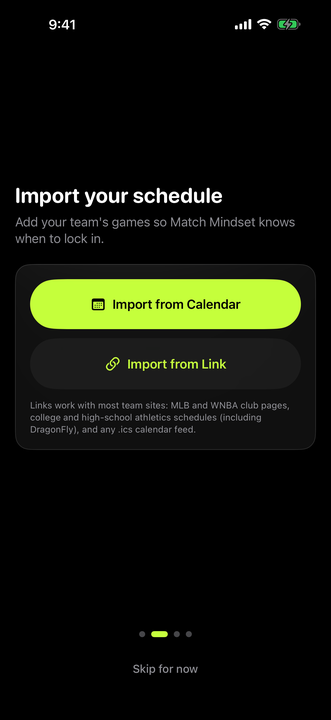
Step 1. Import the season
Pull the games in from your calendar or paste the team's schedule link. It works with most club and high-school athletics pages, including DragonFly, and any .ics feed.
-
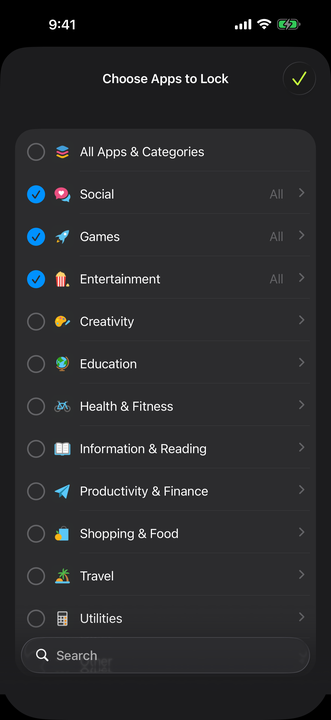
Step 2. Pick what gets locked
Choose the apps and categories that pull your focus. Everything else stays open: calls, maps, music, the team group chat.
-
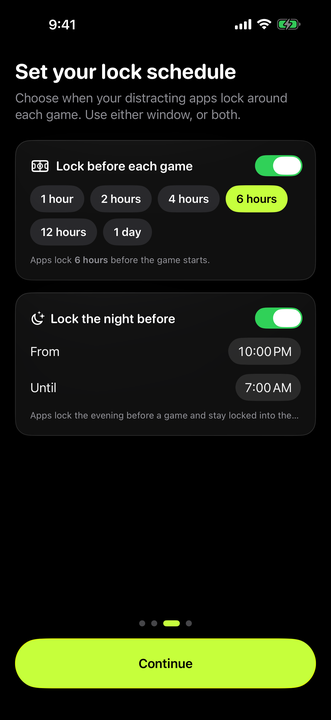
Step 3. Say how early
One hour before the whistle, or six, or a full day. Add the night before if sleep is the thing that keeps slipping. Use either window, or both.
Why it works
Nobody has to be the bad guy
The argument about the phone happens once, in August, with everybody calm. The schedule handles the rest of the season.
-
One import, whole season
Every game on the schedule gets its own lock window. Move a game and the window moves with it.
-
Your picks, nobody else's
Match Mindset locks only the apps and categories you selected, and only inside the windows you set.
-
Sleep the night before
An optional overnight window shuts the scroll down before a game. The Sleep tab shows how those nights compare with the rest.
-
It never watches you
No account, no analytics, no advertising. Match Mindset never sees what you use your phone for.
The season
Every game already knows when to lock
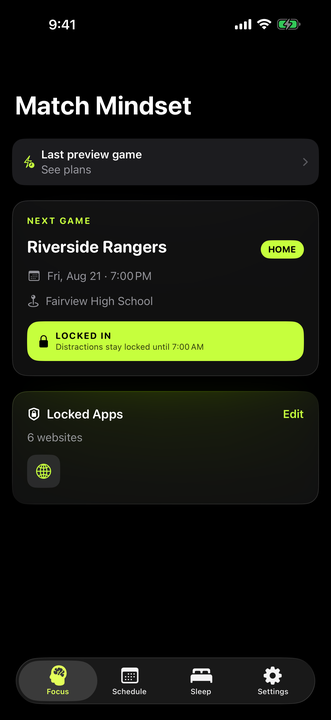
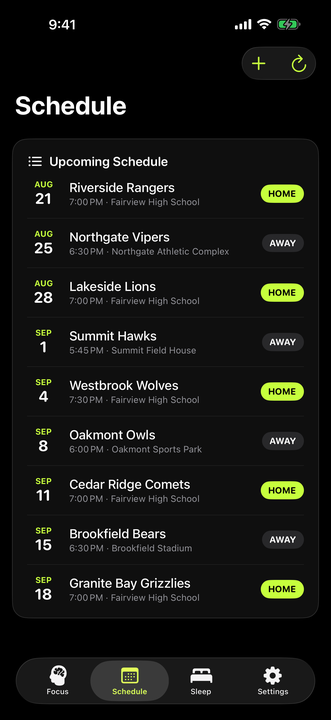
Once the schedule is in, the Schedule tab is the whole plan: date, time, venue, home or away, and a lock window sitting on each one.
- Calendar or link. Import from the calendar on your phone, or paste the team's schedule URL.
- Refresh when the season shifts. Rained out, rescheduled, a tournament added late: pull it in again.
- Add one by hand when a game never makes it onto the official page.
- The Focus tab shows the next one and whether it is locking right now.
Your rules, honestly kept
Easy to set. Deliberately hard to talk your way out of.
The version of you setting this up in August should beat the version of you at 11pm the night before a game.
- Tapping a locked app gets you a shield, not the feed. It names the game you are locking in for.
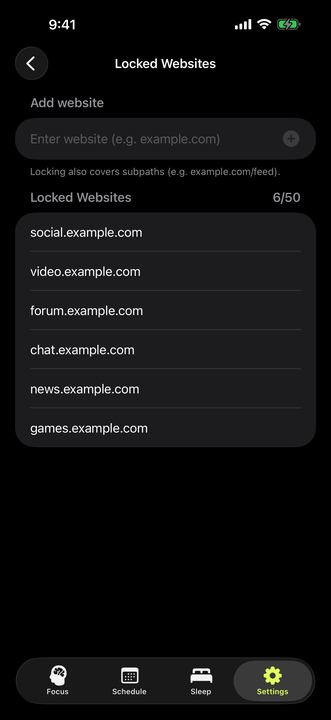
- Websites are covered too, up to 50 of them, subpaths included, so the browser is not the loophole.
- An emergency unlock is always there. It opens everything for 15 minutes, which is enough for a real emergency and short enough not to become the routine.
- Change anything, anytime in Settings: apps, websites, how early, the overnight window.
Pricing
Your first two games are free
Set the season up and the next two games lock without paying anything. After that, Match Mindset Pro keeps it going. Billing is handled by Apple, the plan is Family Shareable, and it cancels any time in your App Store settings.
-
Best value
Full Year
$9.99 / year
Every game, all year, including the offseason. About 83¢ a month, and roughly half the cost of renewing the season pass four times.
-
Season Pass
$4.99 / 3 months
Three months of locking, which covers most single seasons. Same features, renewing quarterly.
Questions
Before you set it up
Where does the schedule come from?
From you. Import the games out of a calendar already on your phone, or paste a link to the team's schedule. Links work with most club and high-school athletics pages, including DragonFly, and with any .ics feed. You can also add a game by hand.
How early does it lock?
Whatever you choose: 1, 2, 4, 6 or 12 hours before the first whistle, or a full day. There is a separate overnight window for the night before a game, which defaults to 10pm until 7am. Use either one, or both.
What happens when I open a locked app?
You get a Match Mindset shield instead of the app. It names the game you are locking in for and offers a way back to what you were meant to be doing.
Can I still use my phone normally?
Yes. Only the apps, categories and websites you picked are locked, and only inside your windows. Calls, messages, maps and everything you didn't pick stay open the whole time. Outside the windows, nothing is locked at all.
What if I genuinely need a locked app?
There's an emergency unlock in Settings. It opens everything for 15 minutes and then the lock comes back on its own, so it stays available without quietly becoming the new normal.
Does Match Mindset collect my data?
No. There is no account, no analytics and no advertising. Your schedule, app selections and settings are stored on your device. It never sees which apps you actually use or how long you use them. Read the full privacy policy.
What does the Sleep tab do?
If you connect Apple Health, it compares the nights before your games with every other night, using sleep, resting heart rate and heart rate variability. It is opt-in and read-only. Nothing is ever written back to Health, and skipping it doesn't affect locking.
Do I need a subscription?
Your first two games lock free. After that, locking needs Match Mindset Pro: $4.99 for three months or $9.99 a year, billed by Apple and cancellable any time in your App Store settings. Your schedule stays either way.
What do I need to run it?
iOS 26 or later on iPhone, or iPadOS 26 on iPad. Match Mindset needs Screen Time permission to lock apps and calendar access to read the team's schedule. It asks for read access to Apple Health only if you want the Sleep tab.
Game day is already on the calendar.
Import the season once. Every game after that takes care of itself.
Coming soon to the App Store
First two games free, subscription after that. iOS 26 or later.